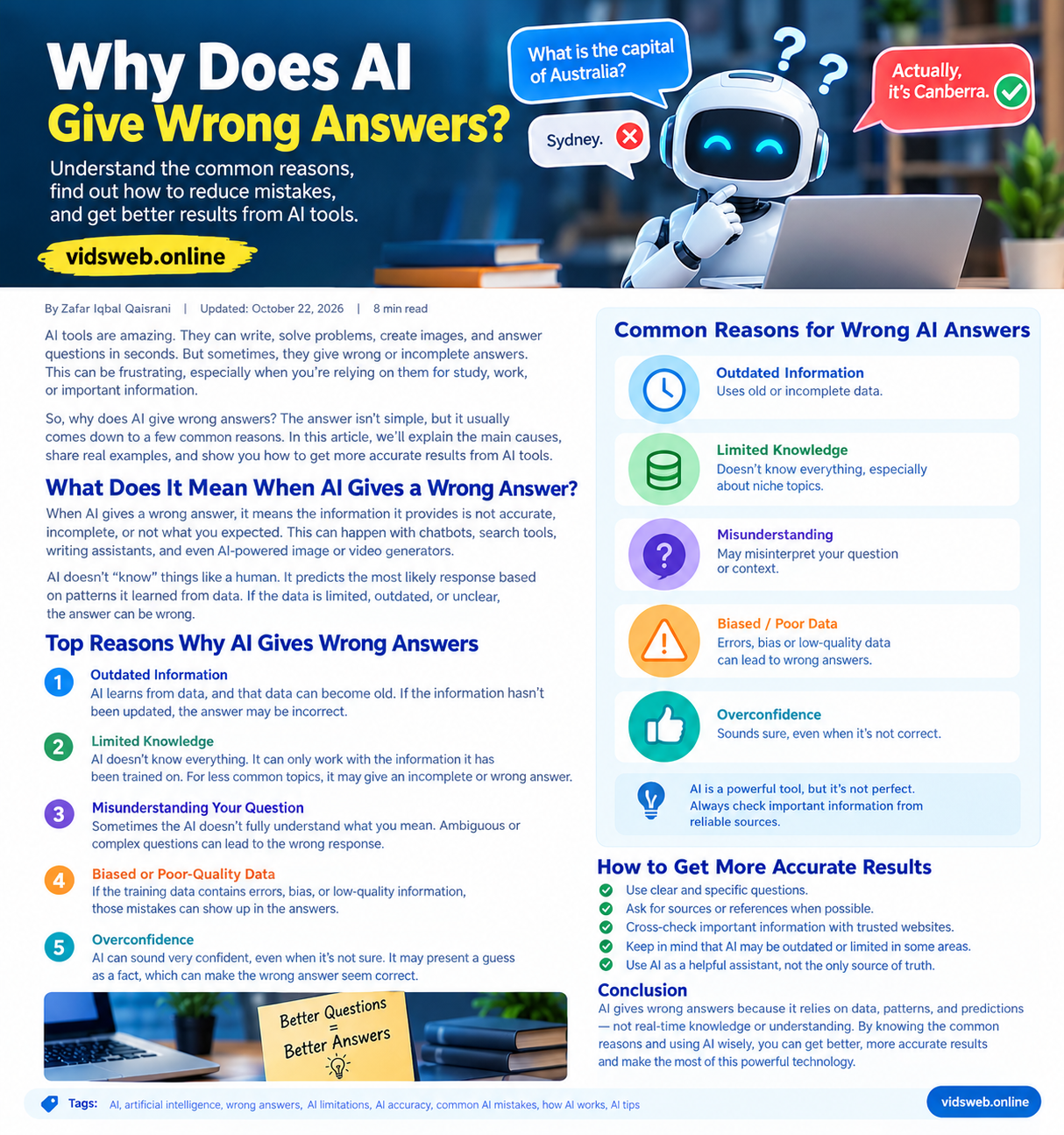
Artificial intelligence has made it easier to find explanations, write content, learn new skills, and solve everyday problems. AI chatbots can respond to questions in seconds, which makes them useful for students, professionals, business owners, and content creators.
However, AI does not always provide correct information. It may invent a fact, misunderstand a question, use outdated details, or recommend something that does not work. What makes these mistakes particularly confusing is that the answer can sound clear, detailed, and completely convincing.
So, why does AI give wrong answers even when it appears confident?
The answer lies in how AI systems learn, process information, and generate responses. Understanding these limitations can help you recognize unreliable answers and make better use of AI tools.
In this guide, we will explore seven common reasons for AI mistakes, examine practical examples, and explain how to verify information before relying on it.
What Does It Mean When AI Gives a Wrong Answer?
An AI system gives a wrong answer when its response contains inaccurate facts, misleading claims, missing information, or an incorrect interpretation of the user’s question.
For example, an AI chatbot might give the wrong release date for a software update, invent a reference that does not exist, or provide a calculation that contains an error.
Not every incorrect answer is completely false. Sometimes a response contains useful information but leaves out an important condition. In other cases, the information was correct in the past but has since changed.
AI systems vary in how they work. Many language models generate responses using patterns learned during training, while some tools also retrieve information from websites, databases, or other external sources.
Neither approach guarantees that every statement will be correct. That is why understanding the causes of AI errors is important.
7 Common Reasons Why AI Gives Wrong Answers
1. AI Can Produce Hallucinations
One of the best-known problems in generative AI is called an AI hallucination. This happens when a system produces information that appears plausible but is false, unsupported, or fabricated.
For example, you might ask an AI assistant to recommend three research papers about a new technology. It could provide convincing titles and author names, yet one of those papers might not exist.
This happens because generating a likely response is different from verifying a fact. A language model may produce text that fits the context without establishing whether every detail is true.
Hallucinations can occur with statistics, quotations, references, technical instructions, and even simple factual questions.
How to reduce this risk: Ask for sources when appropriate, open the original documents, and verify important claims independently. If a source cannot be found, do not treat the claim as established fact.
2. AI May Have Outdated Information
Information changes constantly. Software companies release new features, businesses update their prices, governments revise policies, and public events develop over time.
An AI model may not know about these changes if they occurred after its training data was collected. Even an AI tool with web access may retrieve an old page or miss a recent update.
For example, suppose you ask an AI assistant how to change a setting in a video-editing application. The answer might describe an older interface, even though the application has moved that setting to a different menu.
The instructions may once have been correct, but they are no longer suitable for your version.
How to reduce this risk: For current information, check the official website, recent documentation, and publication dates. When asking about software, mention the application version you are using.
3. AI May Misunderstand Your Question
AI responses depend partly on how a question is worded and interpreted.
A vague prompt can have several meanings. If the system chooses the wrong interpretation, it may provide an answer that is technically relevant but does not solve your actual problem.
Consider this question:
“Which AI tool is best?”
The user might be looking for a video generator, a writing assistant, an image creator, or a tool for studying. Without additional context, there is no single best answer for every situation.
The same issue occurs when a question leaves out an important detail, such as a location, budget, software version, or intended audience.
How to reduce this risk: State your goal clearly, explain the relevant circumstances, and specify any limitations. For complicated tasks, divide your request into smaller questions.
4. AI Training Data Can Be Incomplete or Inaccurate
AI models learn from training data, and that data can contain mistakes, outdated material, conflicting explanations, or gaps in coverage.
Some subjects are well documented, while others have relatively little reliable information available. A model may struggle with an uncommon technical problem, a regional language, or a specialized topic when its available information is limited.
Training data can also reflect biases in the material used to develop a model. These biases may affect which perspectives or examples appear in a response.
However, not all AI errors come from training data. The model’s design, the wording of the prompt, and limitations in its reasoning can also contribute.
How to reduce this risk: Compare important claims with authoritative references. For specialized questions, consult official technical documentation or a qualified professional rather than relying entirely on a general-purpose chatbot.
5. AI Can Make Reasoning and Calculation Mistakes
AI tools can assist with mathematics, coding, planning, and problem-solving, but they can still make errors when combining information or following multiple steps.
For example, an AI assistant might use the wrong value in a calculation, overlook a condition in a programming task, or recommend a solution that fails when tested.
A detailed explanation does not necessarily mean that the underlying reasoning is correct. Some responses may contain a small error that affects the entire conclusion.
How to reduce this risk: Check calculations with a calculator or spreadsheet, test generated code in a safe environment, and verify each important step in a complicated solution. Ask the AI to state its assumptions so you can inspect them.
6. AI Can Give Biased or Incomplete Answers
AI responses may reflect biases in their training material or leave out perspectives that are relevant to a question.
For example, if you ask an AI tool to compare two products, it may focus on price while overlooking privacy, compatibility, ongoing costs, or important limitations.
An answer can also become misleading when it presents one interpretation as though there were no reasonable alternatives.
This does not mean every AI response is biased. It means that the completeness and balance of an answer should be evaluated, especially when the subject involves competing viewpoints or important decisions.
How to reduce this risk: Ask for the advantages, disadvantages, limitations, and alternative perspectives. For comparisons, provide clear criteria and verify claims about each option against reliable sources.
7. AI Can Sound Confident Even When It Is Wrong
AI-generated language can be fluent and professional. Unfortunately, writing quality is not a dependable measure of factual accuracy.
A chatbot may present an incorrect date, invented reference, or unsupported explanation in the same confident tone it uses for a correct answer.
This can encourage people to accept information without checking it, particularly when the response contains technical language or a long explanation.
Confidence in the wording should not be confused with evidence that supports the claim.
How to reduce this risk: Evaluate the evidence rather than the tone. Ask what supports a claim, check the original source, and be especially cautious when the answer could affect health, finances, safety, or legal decisions.
Practical Examples: How to Fact-Check an AI Answer
Understanding the causes of AI errors is useful, but knowing how to check a real answer is even more valuable.
Example 1: Checking a Historical or Geographic Fact
Suppose you ask an AI chatbot, “What is the capital of Australia?” and it answers “Sydney.”
The answer is incorrect. Australia’s capital is Canberra.
To check this type of claim:
- Search an authoritative government or official reference website.
- Locate a source that directly answers the question.
- Compare the source with the AI response.
- Correct the information before using it in an article, presentation, or assignment.
This example illustrates why even simple, familiar questions should not be treated as automatically correct just because an AI answers quickly.
Example 2: Checking Software Instructions
Imagine that an AI tool tells you to open a menu that does not exist in your version of a video editor.
Instead of repeatedly following the same instructions, check the application’s official help documentation. Confirm the version number and operating system, then look for the current instructions.
If the feature has moved or been removed, the official documentation may explain the difference.
This approach can save time and prevent outdated instructions from causing unnecessary problems.
Example 3: Checking Statistics and Research Sources
of assuming it works.
How to Get More Accurate Answers From AI
You cannot eliminate every AI error, but you can improve the quality of the answers you receive.
1. Ask specific questions. Explain exactly what you want instead of using a broad prompt. Include relevant details such as your goal, audience, and experience level.
2. Provide useful context. Mention the software version, budget, location, or other conditions that could change the answer.
3. Request reliable sources. For factual research, ask for official documentation, original studies, or reputable references. Open the sources and confirm that they support the claims.
4. Check current information. For prices, policies, software features, and recent events, prioritize current and authoritative sources.
5. Use the right tool. A calculator is better suited to precise arithmetic, official documentation is useful for software instructions, and a qualified expert may be necessary for high-impact professional advice.
6. Review important details. Verify names, dates, statistics, quotations, calculations, and technical steps before relying on them.
7. Treat AI as an assistant. Use it to organize ideas, explain concepts, and speed up routine tasks. Keep responsibility for important decisions and final verification.
Should You Trust AI Answers?
AI can be very useful, but it should not be treated as an unquestionable source of truth.
For brainstorming, drafting, summarizing, and learning general concepts, AI can provide a helpful starting point. When an answer contains important factual claims, however, you should check whether those claims are supported by reliable evidence.
Use particular caution with medical advice, legal questions, financial decisions, safety instructions, and other high-impact matters. Consult qualified professionals or authoritative sources when appropriate.
For website owners and content creators, fact-checking is especially important. Review generated articles for unsupported claims, verify external references, and make sure the published content genuinely helps readers. Adding AI-generated text without meaningful review does not guarantee accuracy or quality.
The best approach is to combine AI’s speed and convenience with human judgment, careful research, and responsible decision-making.
Frequently Asked Questions
Why does AI sometimes make up facts?
AI models can generate plausible-sounding information without verifying that it is true. These errors, often called hallucinations, may include invented references, incorrect statistics, or fabricated details.
Can AI give 100% accurate answers?
No AI system can guarantee that every response will be correct. Accuracy depends on the task, available information, model capabilities, and other factors. Important information should be checked independently.
Does better prompting prevent AI mistakes?
Clear prompts can reduce misunderstandings and improve relevance, but they cannot eliminate hallucinations, outdated information, or reasoning errors.
Why does AI give different answers to the same question?
Different wording, conversation context, model versions, retrieval results, and randomness in some generation systems can produce different responses to similar questions.
Can AI check its own answers?
AI can review its responses and identify possible weaknesses, but its review may also contain mistakes. Independent sources, calculations, and practical tests provide additional checks.
Is AI useful even if it can be wrong?
Yes. AI can assist with writing, brainstorming, explanations, learning, and many everyday tasks. Its usefulness depends on choosing suitable tasks and checking results when accuracy matters.
Conclusion
AI gives wrong answers for several reasons, including hallucinations, outdated information, misunderstood questions, incomplete training data, reasoning mistakes, bias, and overconfident responses.
These limitations do not make AI useless. They show why it is important to use AI thoughtfully.
Ask clear questions, provide relevant context, check reliable sources, and verify important claims before acting on them. By combining AI assistance with critical thinking and careful research, you can get more value from these tools while reducing the risk of misinformation.
For more practical guides on artificial intelligence, AI tools, and digital content creation, explore vidsweb.online.