
How to Use Google Gemini for Everyday Tasks: A Beginner’s Guide
Artificial intelligence is becoming a useful part of everyday life. From writing emails to organizing information and learning new skills, AI assistants can help people complete many tasks more efficiently.
Google Gemini is an AI assistant that allows users to ask questions, explore ideas, draft text, and work through problems. Beginners can start using it through a web browser without needing advanced technical knowledge.
In this guide, you will learn how to get started with Google Gemini, explore practical examples, and understand its limitations so you can use it responsibly.
you can go official website: https://gemini.google.com/
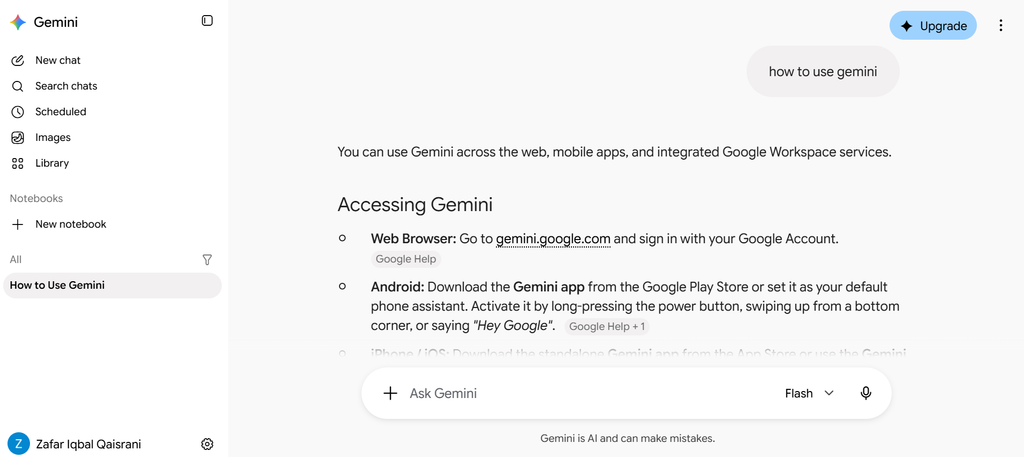
What Is Google Gemini?
Google Gemini is an artificial intelligence assistant developed by Google. It can respond to questions, help with writing, explain concepts, generate ideas, and assist with various productivity tasks.
For example, you can ask it to explain a difficult topic in simpler language, organize a weekly study plan, or suggest ways to improve a paragraph.
Its capabilities depend on the model, account, region, and features available to you. Some functions may require additional permissions or a paid subscription.
How to Get Started With Google Gemini
Follow these steps to begin using Gemini.
Step 1: Open the Official Website
Visit the official Gemini website:
Make sure you are using the official website rather than an unfamiliar third-party service.
Step 2: Sign In if Required
Follow the instructions displayed on the website. Depending on the service and your location, you may need to sign in with a Google account.
Review the applicable terms and privacy information before using the service.
Step 3: Enter Your Question
Type a question or instruction into the message box.
For example, instead of entering only “English grammar,” you could write:
“Explain the difference between the present simple and present continuous tenses. Give me five examples and a short practice exercise.”
A specific instruction helps the assistant understand what kind of answer you need.
Step 4: Review the Response
Read the answer carefully. If something is unclear, ask a follow-up question.
You can request a shorter explanation, additional examples, or a step-by-step guide.
Remember that AI-generated answers can contain mistakes. Verify important information before relying on it.
Five Practical Ways to Use Google Gemini
1. Improve Your Writing
Gemini can help you organize ideas, improve sentence clarity, and draft everyday written communication.
For example, you could provide a paragraph and ask:
“Improve the clarity of this paragraph while keeping its original meaning. Use simple English and avoid unnecessary words.”
Review the suggested changes to make sure they preserve your intended message.
2. Create a Study Plan
Students can use AI to organize learning sessions and identify topics that need more attention.
For example, you could ask for a seven-day revision schedule that includes mathematics, science, English, and regular breaks.
A useful study plan should match your actual timetable, learning needs, and deadlines rather than following a generic schedule without adjustments.
3. Understand Difficult Topics
AI assistants can explain unfamiliar concepts using simpler language and practical examples.
You might ask for an explanation of how the internet works, what a computer processor does, or how basic programming concepts fit together.
For subjects where accuracy matters, compare the explanation with textbooks, official documentation, or trusted educational resources.
4. Organize Daily Tasks
Gemini can help you turn a long list of responsibilities into a manageable checklist.
For example, you could ask it to organize household tasks, study sessions, and work commitments into a daily plan.
Check the proposed schedule yourself and make changes where necessary. The assistant may not know your actual availability unless you provide it.
5. Brainstorm Ideas for a Website
Website owners can use Gemini to explore possible article topics, develop outlines, and identify questions readers may have.
For example, a website about artificial intelligence could publish tutorials explaining common AI features, privacy considerations, or practical uses for beginners.
However, an outline is only a starting point. Research the topic, add original examples, check the facts, and edit the article before publishing it.
How to Write Better Prompts
A prompt is the instruction you give an AI assistant. Clear prompts usually make it easier to obtain useful responses.
Try including four elements:
- Task: Explain exactly what you want.
- Context: Describe your situation or topic.
- Audience: Identify who the answer is for.
- Format: Specify whether you want steps, a checklist, examples, or a short explanation.
For example, a vague prompt might say:
“Write about cybersecurity.”
A more useful prompt would be:
“Explain five basic cybersecurity practices for beginners who use Windows computers. Use simple English, include practical examples, and organize the answer under clear headings.”
The second prompt provides more direction and makes the expected result easier to evaluate.
Is Google Gemini Free to Use?
Google provides access to Gemini through free offerings, although availability, usage limits, and included features can change.
Some advanced models or capabilities may require a subscription. Check the official website for current information about access in your region.
You can begin with basic tasks and decide whether the available features meet your needs before considering a paid plan.
Important Limitations to Understand
Although AI assistants can be useful, they are not always accurate or appropriate for every task.
AI can make mistakes. It may produce incorrect explanations, outdated details, or unsupported claims. Check important information using reliable sources.
Protect your privacy. Avoid entering passwords, confidential documents, financial account details, or other sensitive information into an AI assistant unless you understand the service’s data-handling practices and have permission to share that information.
Review generated content. AI-generated writing may sound convincing even when parts of it are incorrect. Read and edit the output before using it.
Respect copyright and permissions. Do not assume that every generated text, image, or other asset is automatically free of restrictions. Review the applicable terms before using material commercially.
Use human judgment. AI can support decisions, but important personal, professional, financial, or safety-related decisions may require reliable expert guidance.
Frequently Asked Questions
What can beginners use Google Gemini for?
Beginners can use Gemini for explanations, brainstorming, drafting text, organizing tasks, and learning new skills. The available functions depend on the current service and account.
Do I need programming skills to use Gemini?
No. Many common tasks can be completed by writing questions in ordinary language. Programming knowledge is only necessary for certain technical activities.
Can Gemini help me write website articles?
Yes. It can assist with topic research, outlining, and editing. You should independently verify facts, add original value, and ensure the final article is useful to your readers.
Does Gemini always provide accurate answers?
No. Like other AI systems, it can make factual errors. Verify important claims with trustworthy sources rather than assuming every response is correct.
Can I use Gemini on a mobile phone?
Gemini may be accessible through a mobile browser or an official application where available. Check the official service for current device and regional availability.
Conclusion
Google Gemini can be a useful assistant for writing, learning, planning, and exploring ideas. Its greatest value comes from giving clear instructions, reviewing the answers, and applying your own judgment.
If you are new to AI, begin with a simple task such as improving a paragraph or creating a study checklist. As you become more comfortable, explore other features that suit your needs.
Use AI as a tool to support your skills rather than as a substitute for research, accuracy, or independent thinking. This approach can help you get more value from artificial intelligence in your everyday work.