Artificial intelligence tools can help you write articles, learn new skills, generate ideas, and complete everyday tasks. However, getting useful results is not always as simple as typing a question and pressing Enter.
The way you explain your request can make a significant difference. A vague instruction may produce a general answer, while a clear prompt gives an AI tool more information about what you need.
Learning how to write better AI prompts does not require coding skills or technical knowledge. You can start with ordinary language, a clear goal, and a few practical techniques.
In this guide, you will learn how AI prompts work, how to structure your instructions, and how to improve your results through practical examples.
1. What Is an AI Prompt?
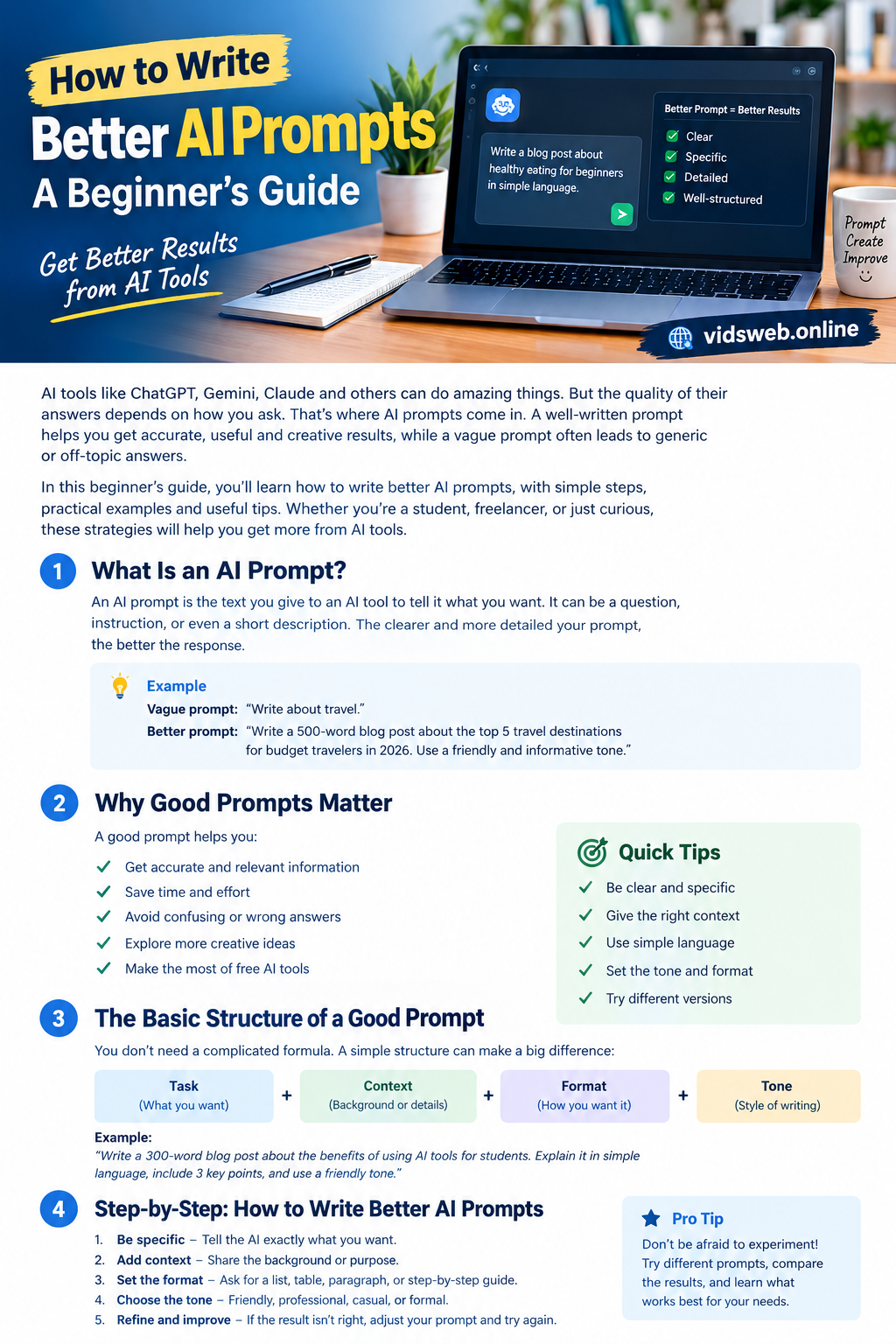
An AI prompt is a question, instruction, or description you provide to an artificial intelligence tool to guide its response.
For example, you might ask an AI assistant to explain a difficult concept, create a study plan, suggest blog topics, or improve a piece of writing.
Consider these two prompts:
Basic prompt:
“Write about technology.”
Improved prompt:
“Write a 500-word beginner-friendly article about how small businesses can use AI tools to save time. Explain three practical uses, include examples, and use simple English.”
The first prompt gives the AI very little direction. The second explains the topic, audience, length, and expected content.
A more specific prompt can help produce a response that better matches your requirements. However, even detailed instructions cannot guarantee that every answer will be accurate or complete.
2. Why Is It Important to Write Better AI Prompts?
Better prompts can make your work with AI tools more efficient and predictable.
Here are four important benefits.
Get more relevant answers
Clear instructions help an AI tool understand the task you want it to perform. This can reduce irrelevant information and make the response more useful.
Reduce unnecessary revisions
When you specify the audience, format, and purpose at the beginning, you may spend less time correcting the response afterward.
Improve your learning and productivity
Students can request explanations and practice questions. Bloggers can develop article outlines, while business owners can brainstorm ideas and organize routine tasks.
Explore different approaches
You can ask an AI assistant to compare options, suggest alternative headlines, or explain a subject from different perspectives.
Remember that AI tools can make mistakes. Review important information before using it, especially when accuracy matters.
3. Use a Simple Formula for Better AI Prompts
A practical starting point is:
Task + Context + Format + Tone
These four elements help you communicate what you need without making every prompt unnecessarily complicated.
Task: What do you want the AI to do?
Begin with a clear action, such as:
- Explain a concept.
- Write an article outline.
- Compare two products.
- Summarize a document.
- Create a weekly study plan.
Context: What information does the AI need?
Explain your purpose, audience, or relevant background.
For example, instead of asking for a guide about budgeting, explain that the guide is intended for beginners who want to organize their monthly household expenses.
Format: How should the answer be presented?
Specify whether you want paragraphs, bullet points, a table, a checklist, or numbered steps.
For a long tutorial, you might request descriptive headings and short paragraphs.
Tone: What style should the AI use?
Choose a suitable style, such as friendly, professional, conversational, or educational.
For beginners, simple language is usually more useful than unnecessary technical terminology.
Put the formula into practice
Suppose you want an AI tool to help you prepare a blog post.
You could write:
“Write a beginner-friendly blog post explaining how small businesses can use AI tools to save time. Include five practical applications, explain each with an example, and organize the article using clear headings. Use a helpful, professional tone and avoid unsupported claims.”
This prompt gives the AI a defined task, relevant context, a structure, and a preferred writing style.
You do not need to include all four elements in every request. A simple question may require only a sentence, while a complex task benefits from more detail.
4. Seven Practical Steps to Improve Your AI Prompts
The following steps can help you apply the formula to everyday tasks.
Step 1: Define your goal
Before writing a prompt, decide what you want to accomplish.
For example, “Help me with my website” is too broad to communicate a specific task.
A clearer alternative is:
“Suggest five practical ways to improve the readability of a beginner-friendly technology blog.”
The second instruction gives the AI a specific objective.
Step 2: Be specific about the subject
Broad requests leave room for different interpretations.
Basic prompt: “Give me marketing ideas.”
Improved prompt: “Suggest seven affordable marketing ideas for a small online shop selling handmade products. Focus on methods a beginner can manage without hiring an agency.”
The improved version specifies the number of ideas, business type, budget, and intended user.
Step 3: Identify your audience
An explanation for a beginner may differ significantly from one written for an experienced professional.
Try this prompt:
“Explain cloud computing to someone who has never studied computer technology. Use everyday examples, avoid unnecessary jargon, and finish with a short summary.”
This tells the AI how to adapt the explanation to the reader.
Step 4: Add relevant constraints
Constraints help define the boundaries of a task.
Depending on your needs, you might specify:
- Approximate word count.
- Required sections.
- Language and writing style.
- Intended audience.
- Information that must be included or excluded.
For example, if you need a short social media caption, mention the desired length instead of asking for a complete article.
Keep your requirements realistic and avoid giving conflicting instructions.
Step 5: Request a useful structure
If you want an organized response, say so directly.
For example:
“Create a blog post outline with an introduction, six descriptive headings, practical examples, and a conclusion.”
You can request a table for comparisons or a numbered list for instructions. The format should suit the task rather than simply make the response look longer.
Step 6: Provide an example when necessary
Sometimes a short example communicates your expectations more clearly than a lengthy description.
For instance:
“Write product descriptions in a simple, informative style. Focus on genuine product benefits, use short sentences, and avoid exaggerated claims.”
This gives the AI a clearer idea of the style you prefer.
Use examples you have permission to share, and do not ask the AI to reproduce another publisher’s work word for word.
Step 7: Review and refine the response
Your first prompt is a starting point, not a final requirement.
If the answer is too complicated, ask for simpler language. In case it lacks detail, request specific examples. If it repeats the same points, ask for a more concise revision.
For example:
“Revise the previous answer for beginners. Remove repeated ideas, keep the important information, and add two practical examples.”
Read the revised version carefully. AI-generated content can still contain factual errors, misleading statements, or unsuitable recommendations.
5. Before-and-After Examples of Better AI Prompts
These examples show how small changes to an instruction can make your requirements clearer.
Example 1: Writing a blog post
Basic prompt:
“Write an article about AI.”
Improved prompt:
“Create a beginner-friendly article explaining five ways students can use AI for learning. Include a practical example for each use, discuss important limitations, and finish with a conclusion. Use simple English and descriptive headings.”
Why it is better: It identifies the audience, scope, structure, and expected level of detail.
Example 2: Learning a new subject
Basic prompt:
“Explain SEO.”
Improved prompt:
“Explain search engine optimization to someone who has recently started a WordPress website. Cover search intent, keywords, page titles, helpful content, and internal links. Give one simple example for each topic.”
Why it is better: It connects the explanation to the reader’s experience and identifies the topics that matter.
Example 3: Creating social media content
Basic prompt:
“Give me Instagram ideas.”
Improved prompt:
“Suggest ten Instagram post ideas for a small bakery. For each idea, provide a headline, a visual concept, and a short caption. Keep the suggestions practical for a business with a limited marketing budget.”
Why it is better: It requests specific deliverables that the user can review and adapt.
Example 4: Writing a professional email
Basic prompt:
“Write an email to a customer.”
Improved prompt:
“Draft a polite email responding to a customer whose order has been delayed. Acknowledge the concern, explain that the delivery status is being checked, and do not promise a delivery date that has not been confirmed.”
Why it is better: It explains the situation, tone, and limitations. Before sending the email, insert the correct order details and verify the facts.
6. Common AI Prompt Mistakes to Avoid
Even a well-intentioned prompt can produce a disappointing response. Watch out for these common mistakes.
Being too vague: Replace “Make this better” with a specific request, such as “Improve the readability, remove repetition, and use shorter sentences.”
Giving conflicting instructions: If you want a very short answer and extensive detail, decide which requirement matters most or request a concise summary followed by a detailed explanation.
Adding irrelevant information: Include context that affects the result. Unrelated background can make your request harder to interpret.
Expecting perfect accuracy: A detailed prompt does not prevent AI from generating incorrect information. Verify important claims using reliable sources.
Sharing sensitive information: Avoid entering passwords, private customer records, or confidential business information unless you have an appropriate, authorized process for handling it. Review the tool’s privacy and data-use policies.
Accepting every response without review: Check the answer for accuracy, clarity, relevance, and suitability before using or publishing it.
7. Quick Tips for Everyday Prompt Writing
Use this checklist whenever you want to improve an AI response.
- Start with a clear action, such as explain, compare, draft, or summarize.
- State your audience and purpose when they affect the answer.
- Include relevant background information.
- Specify the desired format when it matters.
- Use simple, direct language.
- Break complex projects into smaller tasks.
- Give specific feedback when requesting revisions.
- Verify important facts before relying on the output.
- Protect private and confidential information.
- Compare different approaches and keep the instructions that work best for your needs.
8. Frequently Asked Questions
What is the easiest way to write a good AI prompt?
State your goal clearly, add relevant context, and describe the kind of response you need. Specify the format and tone when they are important.
Do I need coding skills to write AI prompts?
No. Most everyday prompts can be written in ordinary language. Coding knowledge is useful for certain technical tasks, but it is not necessary for writing, learning, planning, or brainstorming.
How long should an AI prompt be?
There is no fixed ideal length. A straightforward question may need only one sentence, while a complex project may require several detailed instructions. Include enough information to explain your requirements without adding unnecessary details.
Why does AI sometimes misunderstand my instructions?
Your prompt may be vague, incomplete, or ambiguous. The AI tool may also have limitations. Clarify the objective, add relevant context, and explain what needs to change in the next response.
Can better prompts guarantee accurate answers?
No. Clear prompts can improve the relevance of a response, but they cannot guarantee factual accuracy. Verify important information independently.
What is prompt engineering?
Prompt engineering is the practice of designing and refining instructions to guide AI systems toward useful outputs. For beginners, it often involves clear wording, relevant context, specific requirements, and careful review.
Can I use AI-generated content on my website?
AI tools can assist with research, outlining, drafting, and editing. However, review the content, verify factual claims, add genuine value, and ensure you have the necessary rights to use any included material. For search visibility and advertising eligibility, prioritize useful, original content rather than publishing large quantities of unreviewed AI output.
Conclusion
Learning how to write better AI prompts can help you get more useful results from artificial intelligence tools.
Start by defining your goal, adding relevant context, and specifying the format and tone you prefer. Then review the response and refine your instructions when necessary.
You do not need advanced techniques to get started. Practice with everyday tasks, compare different prompts, and learn which instructions produce results that meet your needs.
Most importantly, treat AI as an assistant rather than an unquestionable source of information. Your judgment, fact-checking, and final review remain essential to producing reliable and useful work.