Artificial intelligence (AI) tools are changing how people write, learn, create content, and manage everyday tasks. From answering questions and improving writing to creating images and editing videos, these tools can help beginners accomplish many tasks without advanced technical knowledge.
However, simply using an AI tool does not guarantee a good result. You need to understand which tool fits your needs, how to write effective prompts, and how to check the information it provides.
In this guide, you will learn how to use AI tools step by step, discover practical examples you can try yourself, and understand the mistakes to avoid. By the end, you will have a simple approach to using AI more effectively in your daily life, studies, or work.
What Are AI Tools and How Do They Work?
AI tools are software applications that use artificial intelligence to perform tasks such as understanding language, generating text, analyzing information, creating images, and assisting with video editing.
Many modern AI tools allow you to interact with them by typing instructions in everyday language. These instructions are called prompts.
For example, you can ask an AI assistant to explain a difficult concept, suggest blog topics, organize a weekly schedule, or improve a paragraph.
The tool processes your request and generates a response based on its capabilities and available information. Some tools can also work with uploaded documents, images, or other supported inputs.
It is important to remember that AI-generated responses are not always accurate. An AI tool may misunderstand your request, provide outdated information, or produce details that sound convincing but are incorrect. Always review important results before relying on them.
Which AI Tool Should You Choose?
Choosing the right tool is the first step toward getting useful results. You do not need dozens of applications to begin. Start with one tool that matches your main goal.
1. ChatGPT for Writing, Learning, and Brainstorming
ChatGPT can help you generate ideas, explain unfamiliar subjects, create outlines, draft emails, and solve problems.
Example: Ask ChatGPT to explain search engine optimization in simple language, with examples suitable for a beginner.
Website: https://chatgpt.com/
2. Google Gemini for General Assistance
Google Gemini can help with questions, brainstorming, writing, learning, and other supported tasks. Its available features may vary depending on your account and location.
Example: Ask Gemini to suggest a realistic weekly plan for learning a new skill.
Website: https://gemini.google.com/
3. Canva for Images and Graphic Design
Canva helps users create presentations, posters, social media graphics, and other visual materials. Some of its features use AI to assist with image creation and design.
Example: Create a draft layout for a social media graphic promoting an educational video.
Website: https://www.canva.com/
4. Grammarly for Writing Improvement
Grammarly can help identify grammar mistakes and improve clarity, tone, and readability.
Example: Review a draft email and suggest clearer, more professional wording while preserving its meaning.
Website: https://www.grammarly.com/
5. CapCut for Video Editing
CapCut provides video editing tools, including AI-assisted features for supported tasks such as captions and editing.
Example: Prepare a short educational video with captions and a clear opening.
Website: https://www.capcut.com/
Features, pricing, and usage limits can change. Check each provider’s official website before choosing a tool or paying for a subscription.
How to Use AI Tools Step by Step
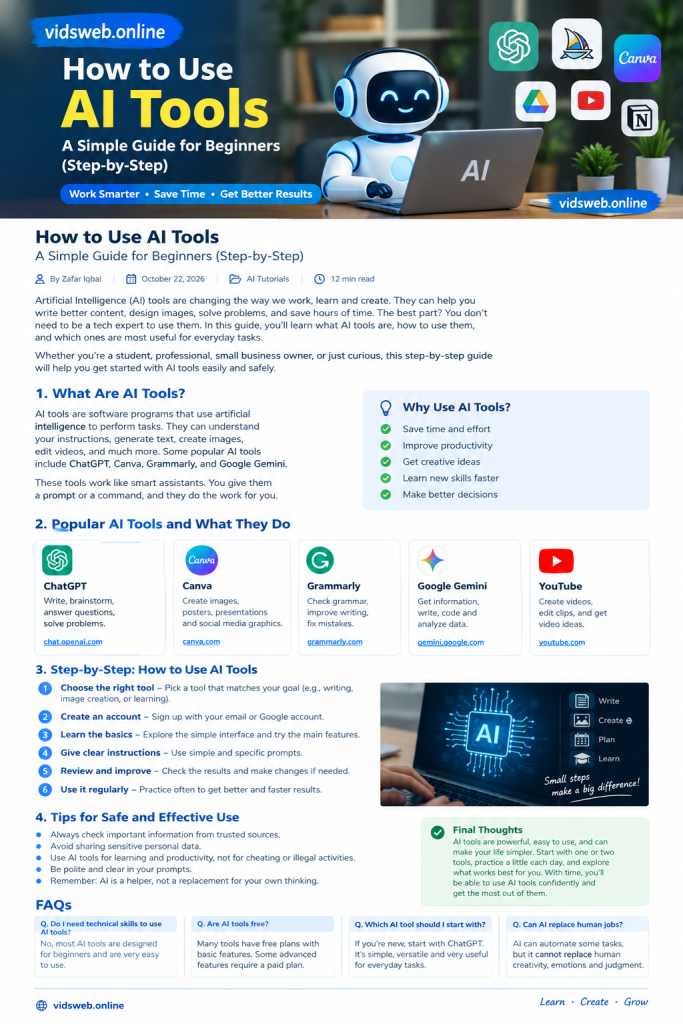
Follow this simple process whether you are using AI for writing, studying, content creation, or everyday productivity.
Step 1: Define the Task You Want to Complete
Before opening an AI tool, decide exactly what you need.
For example, your goal might be to:
- Understand a difficult topic.
- Write a first draft of an article.
- Create ideas for educational videos.
- Improve the grammar of an email.
- Prepare a study schedule.
- Organize information into a table.
A specific goal makes it easier to select a suitable tool and evaluate the result.
Step 2: Select a Suitable Tool
Choose an application based on the task rather than popularity.
A general AI assistant may be enough for writing and brainstorming. A design application is more appropriate for graphics, while a video editor is better suited to assembling and editing video clips.
If you are unsure, begin with a general-purpose assistant and explore specialized tools as your needs develop.
Step 3: Write a Clear Prompt
A prompt tells the AI tool what you want it to do. The quality of your instructions can significantly affect the usefulness of the response.
Consider this example.
Weak prompt:
“Write about technology.”
This request is too broad. The tool does not know your audience, purpose, preferred length, or required information.
Improved prompt:
“Write a beginner-friendly guide of approximately 800 words explaining how students can use AI tools for learning. Include five practical examples, limitations, safety tips, and frequently asked questions. Use clear headings and simple English.”
The improved version gives the tool a defined task and a clearer direction.
For stronger prompts, include four elements:
- Task: Explain what you want the AI to do.
- Context: Describe your audience or situation.
- Format: Specify whether you need a guide, list, table, or email.
- Requirements: Include important details, limitations, or style preferences.
You do not need technical language. Clear, specific instructions are usually a good starting point.
Step 4: Review the First Response
Treat the first response as a draft rather than a finished product.
Ask yourself:
- Does it answer the actual question?
- Are important details missing?
- Are the explanations clear?
- Does it repeat the same ideas?
- Are factual claims supported by reliable evidence?
For information that may change over time, such as software features, prices, and policies, consult current official sources.
Step 5: Improve the Result with Follow-Up Prompts
You do not have to accept the first answer. Ask the tool to improve specific parts.
For example, try these instructions:
- “Explain this concept using a simple real-world example.”
- “Remove repeated ideas and improve the structure.”
- “Identify claims that need fact-checking.”
- “Rewrite this paragraph in clearer English without changing its meaning.”
- “Add practical steps that a beginner can follow.”
Specific follow-up instructions generally make the revision process more productive.
Step 6: Check Privacy and Accuracy
Before using the result, verify important details and consider whether you are sharing sensitive information.
Avoid entering passwords, payment details, confidential business information, or private customer records unless you have a legitimate reason and understand the service’s privacy protections.
For important medical, legal, financial, or safety matters, do not rely solely on an AI-generated answer.
Step 7: Edit and Apply the Final Result
The final step is to make the output suitable for its intended purpose.
If you are preparing an article, add relevant examples, verify claims, and remove unnecessary material. Else you are creating a video, check the script, captions, and visuals. If you are studying, compare explanations with your course materials.
Your own judgment and knowledge remain important throughout the process.
Five Practical AI Prompts You Can Try Today
The following examples show how to turn everyday tasks into clear instructions.
1. Create a Learning Plan
Use this prompt when you want to learn a new skill.
Prompt:
“Create a 14-day beginner learning plan for understanding the basics of artificial intelligence. Include one manageable task per day, useful practice exercises, and a short weekly review. Assume I can study for 30 minutes daily.”
How to use the result: Adjust the schedule to your available time and practise each skill instead of only reading the plan.
2. Generate Blog Article Ideas
This prompt can help website owners plan useful content.
Prompt:
“Suggest 10 original article ideas for a beginner-friendly website about AI tutorials. For each idea, provide a specific reader problem, a possible search phrase, and three practical points the article should cover. Avoid repeating the same topic.”
How to use the result: Review the ideas, compare them with existing articles on your website, and choose a topic that offers genuinely useful information.
3. Improve a Paragraph
Use this prompt to improve readability.
Prompt:
“Review the following paragraph for grammar, clarity, and readability. Preserve the original meaning, remove unnecessary repetition, and explain any important changes. Do not add facts that are not in the original text.”
Paste your paragraph after the instruction.
How to use the result: Compare the revised version with your original and keep only the changes that improve the writing.
4. Plan a Short Educational Video
This is useful for creators who want to explain a topic quickly.
Prompt:
“Create a 45-second educational video script explaining what an AI prompt is. Include an attention-grabbing opening, one simple example, a practical tip, and a short conclusion. Use natural language suitable for beginners.”
How to use the result: Verify the explanation, adapt the script to your style, and check that the spoken words fit the intended video length.
5. Organize a Busy Day
AI can help turn a list of tasks into a manageable schedule.
Prompt:
“Organize these tasks into a realistic daily schedule. Prioritize urgent tasks, include short breaks, and leave some flexible time for unexpected work. Do not schedule more tasks than can reasonably fit into the available hours.”
Add your non-sensitive task list and available hours.
How to use the result: Adjust the schedule to your actual commitments rather than following it blindly.
Common Mistakes to Avoid When Using AI Tools
Even useful AI tools can produce disappointing results when used incorrectly.
Giving Instructions That Are Too General
A vague request often produces a generic response. Add context, describe the intended audience, and explain what a successful result should include.
Accepting Every Answer Without Checking
AI tools can generate incorrect facts, fabricated references, and misleading explanations. Verify important claims before publishing or acting on them.
Using Too Many Tools at Once
Trying multiple applications before understanding any of them can waste time. Start with one tool, learn its main features, and expand your workflow only when there is a clear benefit.
Publishing Unedited AI Content
AI-generated material may contain repetition, errors, or information that does not meet readers’ needs. Review the content, add meaningful expertise, and make sure it provides real value.
Ignoring Privacy and Usage Terms
Before uploading documents or publishing generated material, review the tool’s privacy terms, relevant usage restrictions, and applicable content rights.
How to Use AI Tools for Blogging and SEO
For website owners, AI can support several stages of content creation, including brainstorming, outlining, editing, and organizing research.
However, using AI does not automatically make an article helpful or improve its search rankings.
A practical workflow looks like this:
1. Research the reader’s problem. Identify the question the article should answer and what readers need to learn.
2. Create a useful outline. Use AI to organize the subject into logical sections, but remove unnecessary headings.
3. Verify the information. Check factual statements against reliable sources and official documentation where appropriate.
4. Add original value. Include your own explanations, practical examples, observations, or properly tested workflows.
5. Edit for readability. Remove repetition, explain technical terms, and make sure each section contributes something useful.
6. Review the finished page. Check links, headings, mobile readability, images, and relevant internal links before publishing.
Google’s guidance focuses on helpful, reliable, people-first content. The important goal is to serve readers rather than produce large amounts of low-value material.
For more information, visit Google’s official guide: https://developers.google.com/search/docs/fundamentals/creating-helpful-content
Are AI Tools Free?
Some AI tools offer free plans, while others provide paid subscriptions or charge for specific features.
Free plans may limit the number of requests, access to advanced models, image generation, video exports, or other capabilities.
Before subscribing, check the current pricing and free-plan limitations on the provider’s official website. Start with the features you genuinely need instead of paying for several services immediately.
Frequently Asked Questions
1. How do I start using AI tools as a beginner?
Choose one simple task, open a suitable AI application, and describe what you want in clear language. Review the answer, verify important information, and improve it with follow-up instructions.
2. Which AI tool is best for beginners?
ChatGPT and Google Gemini are useful starting points for general questions, writing, and brainstorming. For design or video editing, a specialized application may be more suitable.
3. Do I need coding skills to use AI tools?
No. Many everyday AI applications use simple interfaces and natural-language instructions. Coding is useful for some advanced applications but is not required for many common tasks.
4. Can AI tools make mistakes?
Yes. AI tools can misunderstand instructions, provide inaccurate information, and generate false details. Always verify important claims using reliable sources.
5. Can I use AI-generated content on my website?
AI can assist with research, drafting, and editing. However, published content should be accurate, original in its presentation, useful to readers, and reviewed before publication. Using AI does not guarantee search rankings or advertising approval.
6. How can I get better results from AI prompts?
Explain the task, provide relevant context, specify the output format, and describe your requirements. If the response is incomplete, give a targeted follow-up instruction.
7. Are free AI tools enough for beginners?
Often, yes. Free features can be sufficient for learning, brainstorming, and many everyday tasks. Whether you need a paid plan depends on your workload and the specific features you require.
Conclusion
Learning how to use AI tools effectively begins with a simple process: identify your goal, choose the right application, write a clear prompt, review the result, and improve it where necessary.
You do not need to master every AI tool or pay for several subscriptions to get started. Begin with one practical task, learn from the results, and gradually develop a workflow that fits your needs.
Used thoughtfully, AI can help you save time, explore ideas, and learn new skills. The best results come when you combine its capabilities with accurate information, careful review, creativity, and your own judgment.
For more practical AI tutorials and beginner-friendly technology guides, visit vidsweb.online.